
Download Super Simple Website Checker – Website Checker, Web Monitoring, Uptime Monitoring
Overview
Super Simple Website Checker is a lightweight desktop application designed to monitor the uptime and status of websites. The software enables users to track the availability of their websites by performing automated checks every 15 minutes. If a website fails to return an HTTP 200 OK status, the app sends an email notification to alert the user of the issue. This functionality makes it particularly useful for individuals and small teams who need to ensure their online presence remains active and accessible.
The tool is ideal for webmasters, developers, and digital content managers who require a straightforward way to verify website health without relying on complex monitoring platforms. Its primary purpose is to simplify the process of uptime tracking, offering a minimalistic interface that focuses on core functionality. The app was developed using Google Apps Script, leveraging components such as HtmlService, ScriptDb, triggers, and UrlFetch to manage data and automate checks.
Real-world use cases include monitoring a personal blog, a small business website, or a client’s online portal. Users can add multiple websites for continuous surveillance and remove any entries at any time using the built-in Remove button. The application runs as a desktop tool, providing consistent monitoring regardless of user activity or device state.
Key Features & Capabilities
- Automated 15-Minute Checks – The app performs regular status checks on all monitored websites every 15 minutes, ensuring timely detection of downtime.
- Email Alerts for Downtime – When a website fails to respond with an HTTP 200 OK status, the system triggers an email notification to inform the user immediately.
- Simple Website Management – Users can easily add, view, and remove websites from the monitoring list using intuitive interface controls.
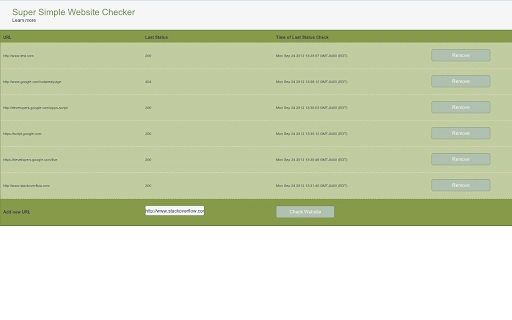
- Real-Time Status Display – The app provides a clear visual indication of each website’s current status, allowing users to quickly identify issues.
- Open-Source Transparency – The source code is publicly available, enabling users to inspect, modify, or learn from the implementation using Google Apps Script.
These features support efficient workflow integration for users who need to maintain website reliability. For example, a freelance developer managing multiple client sites can use the tool to verify uptime without switching between platforms. Similarly, a content creator can monitor their blog’s availability during high-traffic periods. The email alert system ensures that no downtime goes unnoticed, minimizing potential impact on user experience or business operations.
User Interface, Workflow & Performance
The user interface of Super Simple Website Checker is designed with simplicity in mind. It presents a clean, uncluttered layout that focuses on essential functions: adding websites, viewing their status, and removing entries. Navigation is straightforward, with minimal steps required to manage the monitoring list. The app uses a tabular or list-based display to show each website’s name, current status, and last check time.
Workflow efficiency is enhanced by the automated nature of the checks. Once a website is added, no further manual input is required. The application runs in the background, performing checks at scheduled intervals without user intervention. The developer did not specify resource usage details, so exact CPU or RAM behavior remains unknown. However, given the lightweight nature of the tool and its reliance on Google Apps Script, it is expected to operate with minimal system impact.
Stability is likely supported by the robust infrastructure of Google’s cloud platform. Since the app is built on a serverless architecture, it benefits from Google’s scalability and uptime guarantees. Performance observations are based on general software behavior patterns, and no user-reported issues were provided. The app is designed to be reliable over time, with checks executed consistently every 15 minutes.
Compatibility & System Requirements
Super Simple Website Checker is compatible with Windows, Mac, and Linux operating systems, making it accessible to a broad user base across different platforms. The application has a compact installation size of 1.2 MB, which suggests a lightweight footprint and fast setup process. This small file size indicates minimal storage requirements and quick deployment.
Exact system requirements were not listed. The developer did not provide additional system requirements, so users should ensure their system meets general desktop application standards. Compatibility information was partially provided, with support confirmed for major desktop operating systems. The app runs as a standalone desktop tool, requiring no special hardware or software dependencies beyond a standard internet connection.
Pros and Cons
Pros
- Free to use with no hidden costs
- Simple, intuitive interface suitable for non-technical users
- Automated 15-minute monitoring reduces manual effort
- Real-time status updates and email alerts for downtime
- Open-source code allows transparency and customization
Cons
- Exact performance metrics and system requirements not specified
- Relies on external services (Google Apps Script) for core functionality
- No built-in reporting or historical data tracking
- Limited customization options for alert frequency or thresholds
- Only available as a desktop application with no mobile version
FAQ Section
Is Super Simple Website Checker available for all operating systems?
Yes, the software is compatible with Windows, Mac, and Linux, ensuring broad accessibility across different desktop environments.
Is the software secure to use?
As a tool built on Google Apps Script, it leverages Google’s secure infrastructure. However, users should ensure their email account used for alerts is protected with strong authentication.
How often does the app check website status?
The app checks the status of monitored websites every 15 minutes, providing regular and consistent monitoring.
Can I customize the alert frequency or thresholds?
Currently, the app performs checks every 15 minutes and sends alerts only when a website fails to return an HTTP 200 OK status. No customization options for alert timing or thresholds are available.
Is there a mobile version of the app?
No, the application is designed for desktop use only and does not have a mobile counterpart at this time.
Final Thoughts + CTA
Super Simple Website Checker delivers a focused, no-frills solution for monitoring website uptime. Its core strength lies in simplicity and reliability, offering automated checks with timely email alerts—ideal for users who need a basic yet effective monitoring tool without the complexity of enterprise platforms. While it lacks advanced features like historical reports or customizable thresholds, its open-source nature and free availability make it a compelling option for individuals and small teams.
Given its lightweight design, cross-platform support, and straightforward workflow, this tool is best suited for developers, freelancers, and small business owners who manage a few websites and require a dependable, low-maintenance monitoring solution. For those seeking a secure, free, and easy-to-use web status checker, Super Simple Website Checker stands out as a practical choice.
Download Super Simple Website Checker now







